[Do you like this? Please subscribe to my YouTube Channel and then share it for me!]
Video Summary
You get a request from a friend of yours that you’ve been friends with for years, and now suddenly you’re getting another one. Or somebody tells you that they got a friend request from you, and oftentimes it comes up as like, “Well, my account is hacked, so don’t pay any attention to anything from me.”
Well, your account isn’t actually hacked. Anybody can create a new account on Facebook, and all they have to do is grab your picture, look at everybody who’s your friend and start inviting them. It’s really simple for someone to do. So how do you get rid of that? That’s the question. And it’s very easy.
Learn how to report fake Facebook accounts to get them deleted by following these easy steps…
Video Transcript
Hey, this is Jeffrey Kirk and I want to welcome you to my channel. Today I’m going to show you how to report fake Facebook accounts to get them deleted. Before I do that, be sure to subscribe to my channel and turn on the notifications so you don’t miss my next video. Alright, let’s get started!
Since you’re watching this I can assume you use Facebook, at least once in a while, and you’ve been frustrated because you get friend requests from people who are already your Facebook friends. Sometimes you might notice right away because it’s a close friend who appears to be making a new friend request.
Sometimes you might not realize it at all because the request comes from someone who has been a friend for a long time, but you’ve lost contact. You don’t realize you are already Facebook friends. In the latter case, you might accept the friend request and then you’re connected to someone who is not really your friend.
Of course, if you notice the problem and you notify your friend, then that friend is likely to send out a message saying their Facebook account has been hacked, and do not respond to any new friend requests that they send out. And that’s great, but their account was not really hacked, and sending out a message to not respond to friend requests does not solve the problem.
It’s Not a Hack. It’s a Scam!
It is not a hack because no one has infiltrated your friend’s account. If they had, they could not send you a new friend request because your account and your friend’s account are already connected. Instead, what the scammers do is create a new account using the name of your friend. And then they grab your friend’s profile and cover photos and put them in the new account, so that it looks correct.
Then they start sending friend requests to your friend’s existing friends. And if you’re one of them, that’s why you get the friend request. This is a scam because if the fraudster successfully connects with you, that person can later message you, and you will believe it’s your friend.
Maybe they say they are in a predicament and need some cash. Will you help? Who’s going to turn down a friend, especially if the dollar amount is low? Fortunately, Facebook has provided a very easy way to shut down these fake friend accounts so you can get them deleted and stop the scammers from using your Facebook friends.
Now I’m going to go to my computer to show you exactly what to do to have Facebook delete those accounts.
So a couple days ago, a friend of mine lets me know that someone’s attempting to spoof my account, because he got a “friend request” from me. And I say “friend request” in air quotes because I never sent that. And how often do you see that?
You get a request from a friend of yours that you’ve been friends with for years, and now suddenly you’re getting another one, and you go, “Hmm, that’s interesting.” Or somebody tells you that they got a friend request from you, and oftentimes it comes up as like, “Well, my account is hacked, so don’t pay any attention to anything from me.”
Well, your account isn’t actually hacked. Anybody can create a new account on Facebook, and all they have to do is grab your picture, look at everybody who’s your friend and start inviting them. It’s really simple for someone to do. So how do you get rid of that? That’s the question. And it’s very easy.
How To Report Fake Facebook Accounts To Get Them Deleted
I’m on a desktop, but the process is the same on your phone. You just come up here to the notifications and you’ll see recent friend requests, and here I’ve got two of them right now that are fake. So I’m going to go to this one here. This was sent the longest ago, two days ago.
And instead of clicking confirm or delete or sending a message to my friend saying that somebody’s spoofing his account, I’m going to just take care of it. It’s really easy. You just click on it and it will open up that friend’s page, and then come to the three dots. And these three dots also exist on the phone.
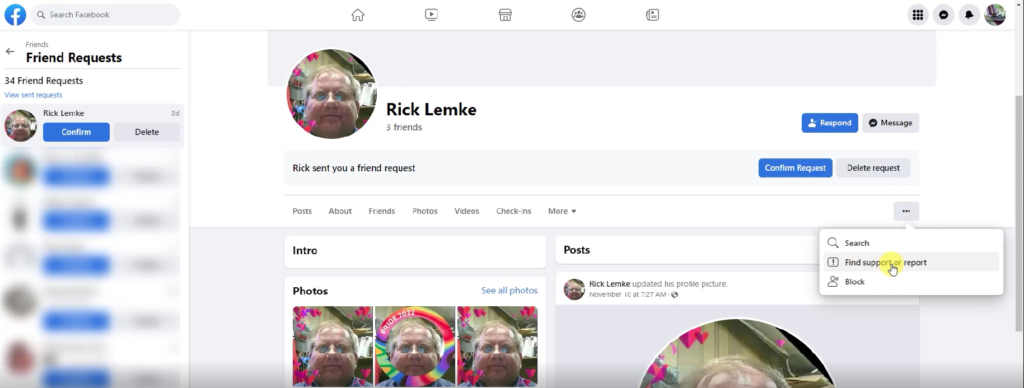
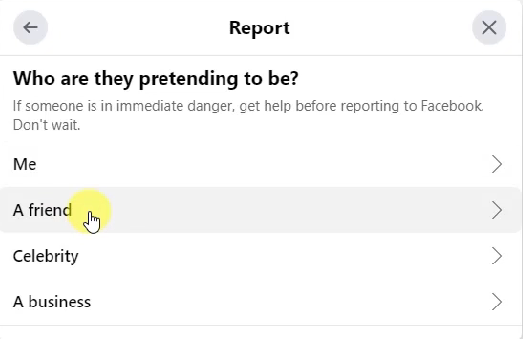
You click that and one of the options is find support or report. So click on that and then I’m going to choose pretending to be someone. This is someone who’s pretending to be someone else, and so I click it. And who are they pretending to be? Well, if you find that it’s yourself that’s being faked out, well then, click on you. Say me, in this case.
In this case, it’s my friend, so I’m going to say a friend, and then you put in their real name. And Facebook will show you. Here’s your friend of that name. Yep, that’s the correct friend. And then hit send. And really, that’s all I need to do at this point in time.
I click submit and Facebook gives me an update. They say the report’s been received, they’re going to review it, and then they’re going to make a decision. And they say they’ll send you a notification about the outcome. That’s not really going to happen. What happens is that, because it’s your friend, they view you as high authority and they take it seriously at that point in time.
They can easily see that the fake account is a duplicate of the one that exists for a long time and they can make that decision that it’s fake. And, often, I have seen the fake accounts disappear in less than five minutes. Now, they’re not always that fast. Sometimes it might even take up to a day, but usually it’s pretty quick.
So it’s faster than notifying your friend and telling them, “Hey, somebody’s created a fake account in your name.” Or, “Somebody’s hacked your account. You better go change your password.” None of those things are necessary.
All you need to do is come in and tell Facebook that this is a fake account and point them to the real one, so that they have that evidence and they can make that decision easily. Then I click done, and that’s it. I might get a notice in Facebook. I might get a notice in email, telling me that something was done, but don’t count on it.
Conclusion
I’ve done everything I can at this point for my friend, and this fake account will just go away… Well, that’s all. It really is that simple. Often when I get friend requests from people I know, I will do a quick Facebook search to see if I am already friends with the person who sent me the request.
If I am friends, I immediately follow the process I just showed you. That way the problem might be resolved, and my friend… My real friend never even knows it happened.
Be sure to click the thumbs up button to like this video, and please comment to let me know you did this and got a fake friend’s account removed.
Thanks for watching and have a great day!